TallyStamp › From paper card to phone
How to move your paper stamp card to your customers' phones
You copy the stamps your customers already had on their paper card onto the card on their phone, so they don't lose any. Free for up to 100 active customers.
Before you start
Design a card in the app with the same number of stamps and the same reward as the paper one. If it's your first card, follow the guide “How to create a digital loyalty card”.
With each customer who brings their paper card
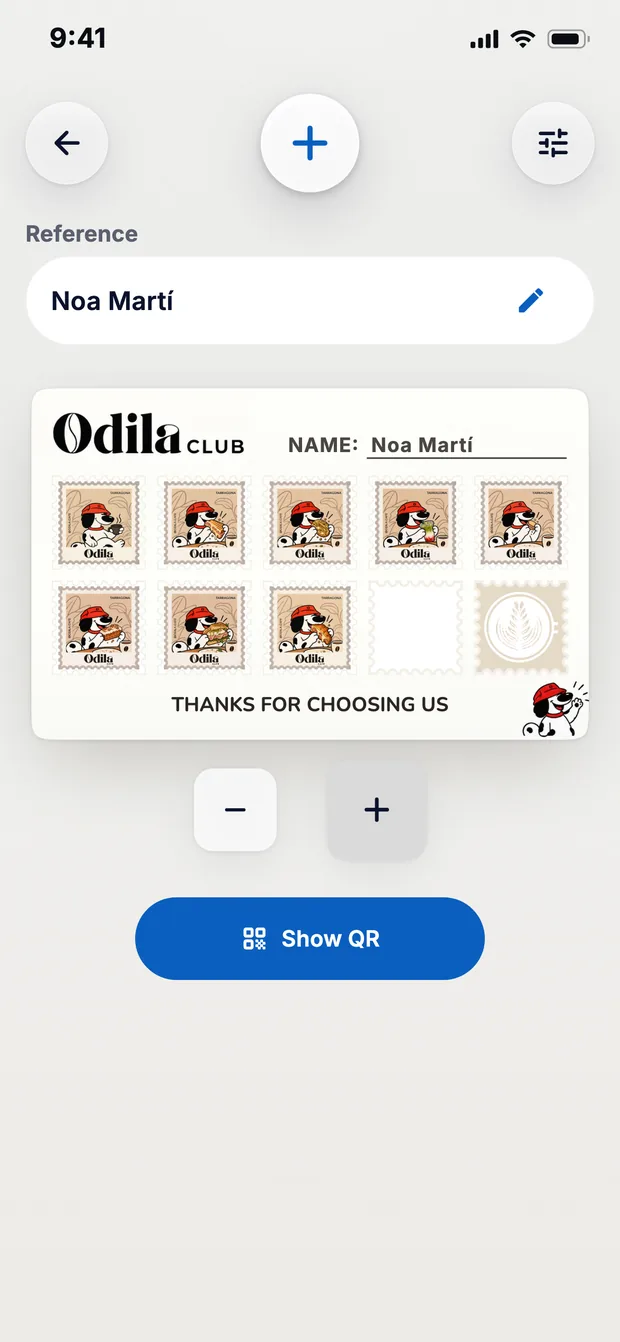
- Open Create and swipe to your card.
- If you want to find them in your list later, type their reference: a name, a nickname or a number.
- Tap + as many times as there are stamps on the paper card.
- Tap Show QR. Your customer scans it and the card reaches them with their stamps.
- Keep the paper card so it can't be used twice.
If the paper card is already full, give them the reward and hand them the phone card empty.
If they don't want to install the app
- Type their reference before tapping Show QR. Their card stays in their record, in Customers, and you stamp it by looking them up by their reference.
- If one day they install the app, you show them the QR code from their record. The card reaches them with their stamps.
What changes compared with paper
- The card is on their phone, so it doesn't get lost or left at home.
- You can change the design whenever you like, without reprinting.
- You have each customer's history.
Questions
How much does it cost?
It's free for up to 100 active customers. With PRO there's no customer limit.
Download TallyStamp and move your first card.